
❖ Browsing media by elrond
Gnome Tweak Tool or the dconf-istry
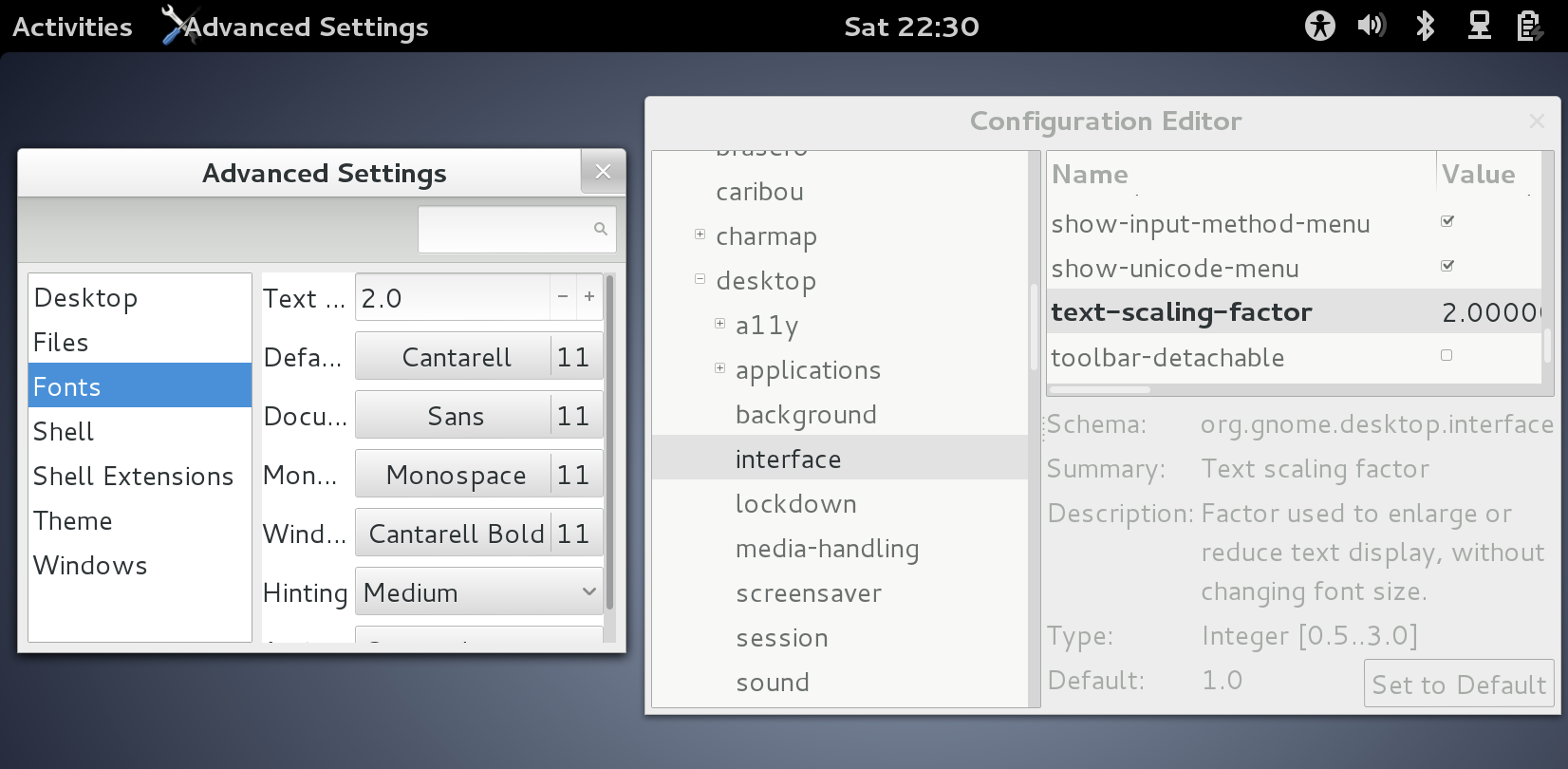
Okay, the last days I tried gnome on my new laptop (an acer aspire r7. I like it mostly). Well, I wanted larger fonts. so after a bit of using-your-favorite-searchengine, I understood, that GNOME is thinking, that it does everything better, of course. And using the DPI from the X-Server is of course wrong. You set it to 96 dpi for every screen. And then there is a font-scaling knob.
So where is that knob? Of course in the gnome-tweak-tool. This starts to feel like in the old days of windows, where you had to install the powertoys to get the tweak-thing. Or wait, you could directly edi the registry, right. Guess what? Right, gnome has it also! It's the dconf-istry!
Oh, now lets look at that knob in details. Yeah, the maximum is 3.0. Multiply by 96 dpi, and you get 288 dpi. Well, my current phone has 440 dpi (and its settings think, it has 480).
I really hope that gnome and the other widget frameworks learn about high dpi devices sooner than later.
Oh, and no, one can't resize gnome-tweak-tool to make the texts next to the knobs readable.